What are the advantages of XVR?
Advantages of XVR: 10 Reasons to Choose Extended Video Recorder
You're comparing recorders. DVR. NVR. And now XVR.Everyone says XVR is "flexible." But what does that actually mean? What are the real advantages of XVR that justify buying one?
And more importantly, what are the drawbacks nobody talks about?This guide covers everything. Advantages. How it works. Components. Comparisons. Limitations. Alternatives. Clear decision criteria.
No gaps. No missing information. Just honest answers.
What is XVR? Quick Recap
XVR stands for Extended Video Recorder.The "X" means extended — it works with multiple camera technologies, not just one.A DVR only works with analog cameras.
An NVR only works with IP cameras. An XVR? It works with both. Plus HD-TVI, HD-CVI, and AHD formats.
One video recorder. Five camera types. That's the basic idea.
For detailed explanation, read our guide on What is XVR?This XVR full form guide explains the technical background.
How Does XVR Work?
Understanding how XVR works helps you appreciate the advantages of XVR.
Here's the simple version:
Step 1: Cameras capture video (any type — analog, HD, or IP).
Step 2: Video signals travel to the XVR through appropriate cables (coax for analog/HD, Ethernet for IP).
Step 3: The extended video recorder detects the signal type automatically.
Step 4: XVR processes and converts all signals to digital format.
Step 5: Footage is compressed and stored on the hard drive.
Step 6: You watch live or recorded footage on monitor, phone, or computer.
The magic happens at Step 3. The XVR recognises what camera you've connected and adjusts automatically. No manual switching. No complicated setup. This what is XVR guide explains the technical process in more detail.
Components of XVR Camera System
A complete XVR system has these parts:
The XVR Unit
The main box. This is your extended video recorder — the brain of the system. Common options include xvr 8 channel for small-medium setups and dahua XVR 16-channel for larger installations.
Hard Drive
Goes inside the XVR. Stores all footage. Bigger drive = more days of recording. Most XVRs support 1TB to 8TB drives.
Cameras
Any combination works:
- Old analog cameras (CVBS)
- HD-TVI cameras (Hikvision format)
- HD-CVI cameras (Dahua format)
- AHD cameras (common budget option)
- IP cameras (network cameras)
Cables
Coax cables (BNC) for analog and HD cameras. Ethernet cables for IP cameras. Power cables or PoE switch for IP cameras.
Monitor
TV or computer screen to view footage. Connects via HDMI or VGA.
Network Connection
Router connection for remote viewing on phone or computer.
Power Supply
Keeps the XVR running. Usually included with the unit.
10 Real Advantages of XVR
Now the main section. Here are the actual advantages of XVR that matter.
1. Works With Any Camera Type
This is the biggest advantage of XVR. You're not locked into one camera technology. Want to use your existing analog cameras? Fine. Want to add new HD-TVI cameras? No problem. Planning to upgrade to IP cameras later? XVR handles that too. One recorder. Total flexibility. DVR limits you to analog. NVR limits you to IP. XVR limits you to... nothing.
2. Keep Your Old Cameras
Already have analog cameras installed? Don't throw them away.With XVR, your old cameras keep working. You add new cameras alongside them. No need to replace your entire system just because you want better technology. This saves serious money. Replacing 8 cameras plus installation could cost PKR 50,000+. With XVR, you spend PKR 0 on replacement — just add what you need.
3. Upgrade Gradually Over Time
Can't afford a full IP camera system right now? No problem.Start with budget analog or AHD cameras. As money allows, add HD-TVI or IP cameras one at a time. Your XVR handles the mix. This is practical for small businesses. Upgrade when budget permits. No rush. No "all or nothing" decisions.
4. One Device to Manage Everything
Multiple camera types, one management interface. Without XVR, mixed systems need multiple recorders. DVR for analog. NVR for IP. Two devices. Two interfaces. Two sets of settings. Chaos.With XVR, everything goes to one place. One screen shows all cameras — regardless of type. One app for remote viewing. One system to maintain.
5. Cost-Effective for Mixed Environments
The advantages of XVR really shine in mixed camera environments.
Scenario: A warehouse has 4 old analog cameras at the back and wants 4 new HD cameras at the entrance.
Without XVR: Buy NVR + 8 new IP cameras. Replace everything. Expensive.
With XVR: Buy xvr 8 channel unit. Keep 4 old cameras. Add 4 HD cameras. Done. Much cheaper.Check available options at our shop.
6. Easy Migration Path
Planning to go full IP eventually? XVR makes the transition smooth. Start with analog/HD cameras on XVR. Replace them with IP cameras over time. Your XVR keeps working throughout the transition. When all cameras are IP, your XVR functions like an NVR. No new recorder needed.
7. Multiple Resolution Support
XVR supports different resolutions simultaneously. Old analog camera at 960H? Works. New 2MP HD-TVI camera? Works. 5MP IP camera? Also works. All on the same recorder. All viewable on the same screen. This matters when you're mixing old and new equipment. The extended video recorder adapts to whatever you connect.
8. Dahua and Hikvision Formats Together
HD-TVI is Hikvision's format. HD-CVI is Dahua's format. Normally, they don't mix.XVR handles both. You can use Hikvision cameras AND Dahua cameras on the same system. This is huge for buyers who find good deals on different brands. You're not locked to one manufacturer. Dahua XVR products are particularly popular for this flexibility.
9. Same Remote Viewing as NVR
Think you'll lose remote access with XVR? Wrong.Modern XVR systems offer full remote viewing through mobile apps and web browsers. Watch any camera — analog, HD, or IP — from your phone anywhere in the world. The extended video recorder connects to your network just like an NVR would.
10. Future-Proof Investment
Technology changes. XVR protects your investment. Buy dahua xvr 16 channel today. Use analog cameras now. Add IP cameras next year. Upgrade to 4K cameras in three years. Your XVR handles all of it.One purchase. Years of flexibility. This XVR guide from Reolink covers additional technical advantages.
XVR vs NVR — Detailed Comparison
Many buyers debate XVR vs. NVR.
Here's the honest comparison.
Camera Compatibility
- NVR: IP cameras only
- XVR: IP cameras + analog + HD-TVI + HD-CVI + AHD
Winner: XVR (more flexible)
Picture Quality (Maximum)
- NVR: Up to 12MP/4K
- XVR: Up to 8MP (most models)
Winner: NVR (slightly better top-end quality)
Cable Simplicity
- NVR: One Ethernet cable per camera (PoE)
- XVR: Depends on camera type — coax or Ethernet
Winner: NVR (cleaner installation for new systems)
Cost for New System
- NVR: Higher (IP cameras cost more)
- XVR: Lower (can use cheaper analog/HD cameras)
Winner: XVR (budget-friendly)
Cost for Existing System
- NVR: Very high (replace all cameras)
- XVR: Low (keep existing cameras)
Winner: XVR (much cheaper for upgrades)
Best For:
- NVR: New installations wanting best quality
- XVR: Mixed systems, upgrades, budget setups
This NVR vs XVR comparison explores more technical differences.
XVR vs DVR — Direct Comparison
Now let's look at XVR vs. DVR.
Camera Compatibility
- DVR: Analog only
- XVR: Analog + HD + IP
Winner: XVR (way more flexible)
Resolution Support
- DVR: Usually up to 2MP
- XVR: Up to 5MP or 8MP
Winner: XVR (better quality options)
Future Upgrade Path
- DVR: Dead end (stuck with analog)
- XVR: Add any camera type later
Winner: XVR (future-proof)
Price
- DVR: Slightly cheaper
- XVR: Slightly more expensive
Winner: DVR (but marginal difference)
Best For:
- DVR: Budget systems using only analog cameras
- XVR: Anyone who might upgrade later
Bottom Line: Unless you're 100% certain you'll never add different cameras, XVR beats DVR. The small price difference buys massive flexibility.Browse Turbo HD DVR 4 Channel and Turbo HD DVR 8 Channel to compare with XVR pricing.
DVR vs NVR vs XVR — Quick Comparison Table
Here's the complete DVR vs. NVR vs. XVR breakdown:
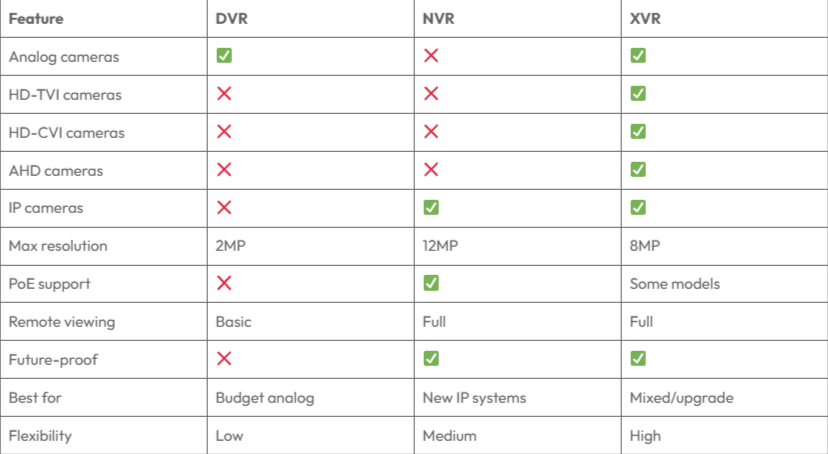
This DVR vs NVR vs XVR guide provides additional technical comparison.
XVR and Camera: Use Cases
Where do the advantages of XVR make the most sense? Here are practical use cases.
Small Retail Shop
You have 2 old analog cameras from 5 years ago. You want to add 2 new HD cameras at the cash counter. XVR 8 channel handles both. Total cost: Just the new cameras + XVR. No wasted equipment.
Growing Business
You started with 4 budget AHD cameras. Business is doing well. Now you want to add 4 high-quality IP cameras for the showroom. XVR manages both sets without replacing anything.
Multi-Location Property Manager
Different properties have different cameras installed over the years. Some analog. Some HD-TVI. Some IP. Instead of managing three different recorder types, you standardise on XVR everywhere. Same interface. Same app. Easier management.
Warehouse with Phases
Phase 1: Install 8 budget cameras with xvr 8 channel. Phase 2 (next year): Add 8 more HD cameras, upgrade to dahua xvr 16 channel. Phase 3: Replace oldest cameras with IP. XVR grows with your needs.
Taking Over Existing System
You bought a shop that already has CCTV installed. No idea what camera types they are. With XVR, it doesn't matter. Connect them and the extended video recorder figures it out. Check cameras compatible with XVR in our top 10 CCTV cameras for small shops.
Limitations of XVRs — Honest Drawbacks
Most articles only list advantages of XVR. Here's what they don't tell you.
Limitation 1: Not the Best at Anything
XVR is a jack of all trades, master of none.For pure IP camera systems, NVR performs better. For pure analog systems, DVR costs less. XVR wins on flexibility but not on specialisation.
Limitation 2: Maximum Resolution is Lower
Most XVR systems top out at 5MP or 8MP. NVR systems go up to 12MP.If you need the absolute best picture quality, NVR beats XVR.
Limitation 3: PoE Support Varies
Not all XVR units support PoE (Power over Ethernet) for IP cameras. You might need a separate PoE switch, adding cost and complexity.Check specs carefully before buying.
Limitation 4: IP Channel Limitations
Many XVR models have limited IP camera channels. A "16 channel XVR" might only support 8 IP cameras + 8 analog cameras, not 16 IP cameras.Read specifications carefully. "16 channel" doesn't always mean "16 of any type."
Limitation 5: Slightly More Complex Setup
With DVR, everything is analog. Simple. With NVR, everything is IP. Also simple.With XVR, you're mixing technologies. More cable types. More settings. Slightly more complicated troubleshooting.
Limitation 6: Processing Power Split
XVR handles multiple signal types. That processing power gets divided. With many cameras of different types, you might see slower performance than dedicated DVR or NVR.
Best Alternatives to XVR Cameras
Sometimes XVR isn't the right choice. Here are alternatives.
Alternative 1: Pure NVR System
Choose if: You're starting fresh with no existing cameras and want the best quality.
Benefits: Cleaner installation (PoE), better maximum resolution, simpler system.
Drawback: Higher camera cost, no flexibility for analog cameras.
Alternative 2: Pure DVR System
Choose if: Budget is very tight and you only need basic surveillance.
Benefits: Cheapest option, simple setup.
Drawback: Limited to analog quality, no upgrade path.
Alternative 3: Hybrid NVR + DVR Setup
Choose if: You have many analog cameras AND many IP cameras, and you want the best performance from each.
Benefits: Dedicated processing for each type.
Drawback: Two systems to manage, more expensive overall.
Alternative 4: Cloud-Based Recording
Choose if: You don't want hardware on-site.
Benefits: No maintenance, accessible anywhere.
Drawback: Monthly fees, dependent on internet, privacy concerns.Find trusted suppliers at largest surveillance camera distribution company.
Choose XVR If...
The advantages of XVR make sense when:
✅ You have existing analog or HD cameras you don't want to replace.
✅ You're on a budget but want future upgrade flexibility.
✅ You plan to upgrade gradually over months or years.
✅ You have mixed camera brands (Hikvision and Dahua together).
✅ You're taking over an existing system and don't know what cameras are installed.
✅ You want one recorder to handle everything instead of multiple devices.
✅ Your cameras are different types — some old, some new, some wired, some HD.
Don't Choose XVR If...
Skip XVR in these situations:
❌ You're building a new system from scratch and want the best quality — go NVR.
❌ All your cameras are already IP — you don't need XVR's flexibility, just get NVR.
❌ You need maximum resolution (8MP+) — NVR handles higher resolutions better.
❌ You want simplest possible setup — dedicated DVR or NVR is simpler than mixed XVR.
❌ Budget is extremely tight and you only need basic analog — DVR costs less.
XVR Records — But Who Actually Watches?
Here's what no video recorder can do: watch your cameras for you.Your XVR records everything. Excellent. But who reviews the footage? Who spots the suspicious person at 2 AM? Who calls authorities when something happens? Recording doesn't prevent crime. It just provides evidence afterward. By then, the damage is done.
Real security means someone watching live.
At GCCTVMS, we add what your extended video recorder can't — trained human eyes watching 24/7.Our Security Operations Center monitors your cameras around the clock. When something suspicious happens:
- Monitor — We watch your feeds live
- Verify — We confirm if it's a real threat
- Alert — We notify you immediately
- Action — We coordinate response if needed
Your XVR stores footage. We provide active protection.Learn about our monitoring services.
Ready to discuss your XVR setup? Book a free 30-minute meeting with our team. No pressure. Just honest advice about what works for your situation.
Or Contact us directly.
